


Add Sparrow to your browser
Install the extension in seconds and pin it to your toolbar. You can start inspecting right away no setup, no configuration.
Preview
Inspect CSS, annotate pages, collaborate live, extract colors, fonts and assets—all from one lightweight browser extension built for developers, designers, and agencies.
Install the extension in seconds and pin it to your toolbar. You can start inspecting right away no setup, no configuration.

Click the Sparrow icon on any site production, staging, or localhost and the full toolkit appears as an overlay.

Switch between Inspect, Annotate, Ruler, Colors, Fonts, and Assets from one rail. Everything happens, so you never lose context.
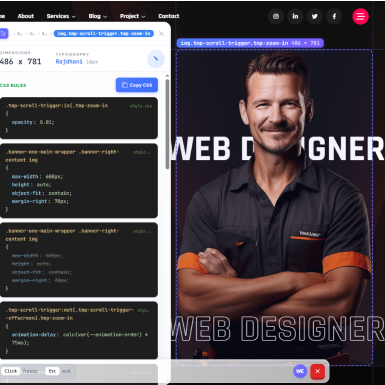
Hover over anything on a page and Sparrow shows you the CSS that actually shaped it the full css, DevTools-style, with overridden rules struck through and the winning declaration on top. If the site uses Tailwind, Sparrow detects it and shows the utility classes separately, ready to copy.
Drop a numbered pin on the exact element you're talking about, write your comment, and share one link. Everyone who opens it sees your notes in context and can reply, resolve, and collaborate live, cursors and all.
Click any element to anchor it, then hover anywhere else Sparrow draws the exact distance between them, with alignment guides projected across the whole viewport so misaligned layouts have nowhere to hide.
Sparrow scans the entire page and lists every color it paints, sorted by how much it's used. Click one to highlight everywhere it appears or swap it site wide to preview a rebrand in seconds. Copy any value as HEX, RGBA, or HSL.
Audit every typeface a page uses, then preview a replacement instantly pick from about 1,900 Google Fonts or upload your own brand font. Swap the whole site or a single element; sizes, weights, and spacing stay exactly as they were.
Sparrow finds every image, SVG, and video a page uses including background images, favicons, and inline SVG that right click can't save. Download a single asset, or grab everything at once as a ZIP.
Send your client one link instead of asking them to describe a bug over email. They click the element, write what's wrong, and you get feedback pinned to the exact spot on the exact page with element context attached, ready to act on or hand to your team.
Every note is anchored to a real element on the real page. No more 'the button on the left, no, the other left' the pin is the location.
Reviewers join in Client Mode: they can comment, reply, and mark items resolved, but they can't edit or delete your work. You keep a searchable review list with open/resolved counts.
Production sites, staging environments, localhost previews. Sparrow runs on all of them without touching your code or your deploy pipeline.
Sparrow replaces a handful of single-purpose extensions with one overlay that stays out of your way.
Debug styles faster than DevTools for everyday questions: what's this font, why is this margin off, which rule wins? Copy the CSS or Tailwind classes and get back to your editor.
Reverse-engineer interfaces you admire. Extract the palette with real usage data, identify every typeface, test your own fonts on a live page, and pull assets for your moodboard.
Turn client feedback from vague emails into pinned, threaded, resolvable comments on the live site. Share one link, watch the review happen in real time, and close items as you ship.
Report visual bugs where they happen. Measure spacing against spec, flag misalignments with the ruler, and file annotations your developers can find without a repro guide.
Sparrow is a browser extension that overlays a design toolkit on any webpage. You can inspect the CSS behind any element, measure spacing, extract colors, fonts, and assets, and pin feedback directly on the live page all without opening DevTools or taking a single screenshot.
No. Designers and clients use Sparrow without writing any code hovering shows you fonts, colors, and sizes in plain terms, and leaving feedback is just click and type. Developers get the deeper layers too: the full CSS cascade, Tailwind class detection, and copy-ready code.
Yes, and it doesn't expire. Free includes the full CSS inspector, the ruler, the website color overview, and 3 annotations per site per day. Paid plans add site-wide color and font swapping, asset downloads, color format switching, and higher annotation limits.
Pro is $9/month ($90/year) and unlocks site-wide color and font swapping, asset downloads, color format switching, and 10 annotations per site per day. Max is $19/month ($190/year) and adds unlimited annotations and unlimited client review links. Paying yearly works out to two months free versus monthly.
Yes. You can switch between Free, Pro, and Max whenever you like, and manage everything — invoices, payment methods, cancellations — from your account portal. If you cancel, you keep your paid features until the end of the billing period you've already paid for, then drop back to Free automatically.
Annotation limits are per site and reset every 24 hours (3 a day on Free, 10 on Pro, unlimited on Max). Reaching the limit only pauses adding new pins on that site for the day, your existing annotations are always saved and stay fully editable and shareable.
Never. Everything Sparrow does — including recoloring a page or swapping its fonts is a local preview that only you see. The real website is untouched, and one click resets any experiment.
Pin your comments, click Share, and send the link. Anyone who opens it sees your annotations in place on the page and can reply or resolve items with live cursors when you're reviewing together. Share links expire after 3 days for safety, but your annotations are saved and you can mint a fresh link anytime.
No. People who join through your link enter Client Mode: they can comment, reply, and change an item's status, but they can't edit or delete your notes.
Any page your browser can open: live production sites, staging environments, and localhost. There's nothing to install on the website itself.
Yes, When an element is styled with Tailwind utilities, Sparrow shows the class list separately from the rest of the CSS and lets you copy the classes in one click.
Yes, uploaded fonts are registered directly in your browser and are never sent to a server. They apply for your current session only.
'%3e%3cpath%20d='M297.5%20526.2L-61.5%20196.7L-185%201844.73C329.948%201847.73%201361.74%201851.92%201369.35%201844.73C1376.95%201837.55%201784.27%201770.9%201986.98%201738.48L2061%201316.45L1986.98%20336.2L1701.5%20595.7C1571.5%20637.2%201437.2%20684.489%201428%20679.7C1416.5%20673.714%201142.5%20731.7%201142.5%20731.7H712.5L297.5%20526.2Z'%20fill='%231066F1'%20fill-opacity='0.8'/%3e%3c/g%3e%3cdefs%3e%3cfilter%20id='filter0_f_80_194'%20x='-381.7'%20y='0.000198364'%20width='2639.4'%20height='2045.4'%20filterUnits='userSpaceOnUse'%20color-interpolation-filters='sRGB'%3e%3cfeFlood%20flood-opacity='0'%20result='BackgroundImageFix'/%3e%3cfeBlend%20mode='normal'%20in='SourceGraphic'%20in2='BackgroundImageFix'%20result='shape'/%3e%3cfeGaussianBlur%20stdDeviation='98.35'%20result='effect1_foregroundBlur_80_194'/%3e%3c/filter%3e%3c/defs%3e%3c/svg%3e)